Feature
Set the app's world before it launches
Configure appearance, status bar, permissions, biometric auth, keychain, and UserDefaults before running your tests.
Appearance, dynamic type, and accessibility
Instant light/dark and accessibility overrides
Test dark mode, dynamic type sizing, and accessibility options without digging through the iOS Settings app. CosmoKit applies appearance changes immediately so you can verify color contrast and layout scalability side by side.
- Toggle between Light and Dark mode instantly
- Adjust Dynamic Type content size categories on the fly
- Preview high contrast and accessibility display options
- Verify adaptive layouts and color schemes across screens
Pixel-perfect status bar overrides
Clean frames for marketing and App Store captures
Set a pristine status bar before taking screenshots or recording demo videos. CosmoKit standardizes the time, battery percentage, cellular bars, and Wi-Fi signal so every capture looks polished and consistent.
- Standardize clock display to 9:41 AM (or any custom time)
- Pin battery status to 100% charged with full indicators
- Set full Wi-Fi and cellular signal strength bars
- Clear overrides with a single click to restore live system state
Permissions without app reinstallation
Grant, revoke, and reset privacy permissions
Modify privacy and hardware permissions on demand without uninstalling the app or resetting the simulator. Toggle access to Camera, Photos, Location, Notifications, and Contacts to test permission prompts and denied states.
- Grant or revoke Camera, Microphone, and Photo Library access
- Toggle Location Services, Contacts, and Push Notification access
- Reset all permissions for a specific bundle ID to test onboarding
- Validate fallback UI and graceful degradation when access is denied
Biometric authentication & Face ID
Simulate enrollment, matches, and failures
Test LocalAuthentication flows without physical hardware. CosmoKit simulates whether the device has biometrics enrolled and lets you trigger matching authentication successes or non-matching failures on demand.
- Toggle Face ID and Touch ID biometric enrollment on or off
- Trigger successful biometric match to test authenticated flows
- Simulate biometric non-match failure to test fallback passcode UI
- Test biometric lockout and retry flows seamlessly
Live UserDefaults and keychain management
Inspect, edit, and reset app state
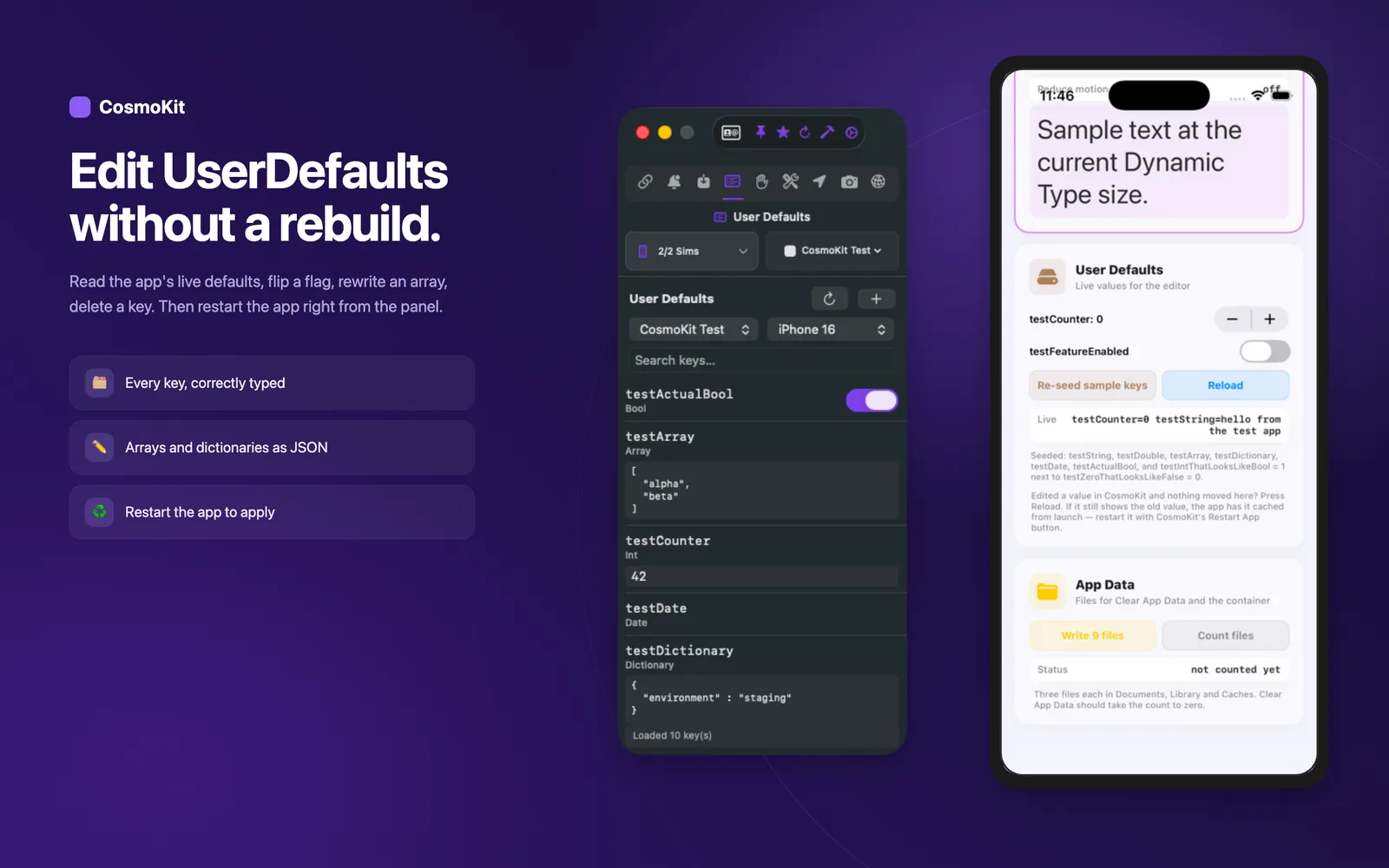
Browse and edit your application's live UserDefaults plist directly. Flip feature flags, edit stored strings or arrays, delete keys, and inspect stored keychain credentials with automatic app relaunch.
- Read and edit app UserDefaults keys, types, and values in real time
- Delete specific preference keys or reset app domain state
- Browse and manage keychain items stored by your simulator app
- Install custom root certificates and reset simulator keychain
Installed apps & container access
Inspect sandboxes and launch lifecycles
Inspect all applications installed in the simulator with bundle IDs and version metadata. Launch, terminate, or uninstall apps with one click, or jump directly into the app's sandboxed Documents and App Group containers.
- Browse installed third-party and system applications
- Launch, terminate, or uninstall apps instantly
- Open app sandboxes, Documents, and Caches in Finder
- Inspect shared App Group container directories directly
Every switch is also a command
Drive environment states from your CLI and scripts
Every environment control in CosmoKit is backed by the free cosmokit CLI and exposed via MCP tools. Automate pristine status bars, permission states, and preference writes inside your CI jobs or AI agent loops.
- Run cosmokit statusbar and cosmokit appearance in scripts
- Control permissions with cosmokit permission grant|revoke|reset
- Trigger biometrics with biometric-enroll and biometric-match
- Read and write preferences with defaults and defaults-write
$ cosmokit statusbar --time "9:41" --battery 100
$ cosmokit appearance dark
$ cosmokit permission grant camera com.example.app
$ cosmokit biometric-match matchReady to test faster?
CosmoKit is a native macOS app. Free to start, no signup.