
Feature
Let your AI agent see and drive the Simulator
A CLI, an MCP server, and an Agent Skill for Claude Code, Cursor, Codex, and any MCP client to read and drive the iOS Simulator.
Compact screen summaries
Read the screen before you act
Ask the CLI for a compact tree instead of parsing a screenshot. Every interactive element has a stable reference and the snapshot carries a screen hash for safe follow-up actions. In benchmarks (see cli/BENCHMARK.md), act mode cuts token payload by 92.7% vs raw driver JSON and 94.6% vs idb.
- act lists interactive elements and stable refs for actions
- nav includes interactive elements plus useful navigation headings
- debug includes the full hierarchy and accessibility identifiers
- Cuts token payload by 92.7% vs raw driver JSON and 94.6% vs idb in benchmarks
- Use --max on long screens to keep the response bounded
$ cosmokit ui tree --mode act
[1] cell "Settings" (0,0 390×50)
[2] cell "General" (0,50 390×50)
[3] button "Add Account" (0,100 390×50)
screen: 84346bb2
Act without guessing
Refs, waits, and a guard against stale screens
Use refs from the latest tree with tap, press, swipe, type, button, alert, or find. Pass --screen <hash> to refuse an action when the UI changed; screenChanged and refStale tell the agent to read a fresh tree.
- ui wait waits for text to appear or disappear without polling trees
- ui do batches known steps and stops at the first failure with its step index
- Prefer refs over coordinates and re-read after a screen change
- Use one tree per step; take a screenshot only when layout matters
screen=$(cosmokit ui tree --mode act | sed -n 's/^screen: //p')
cosmokit ui tap 2 --screen "$screen"
cosmokit ui wait "General" && cosmokit ui tree --mode act
Follow along in your browser
Let a person leave feedback on the live simulator
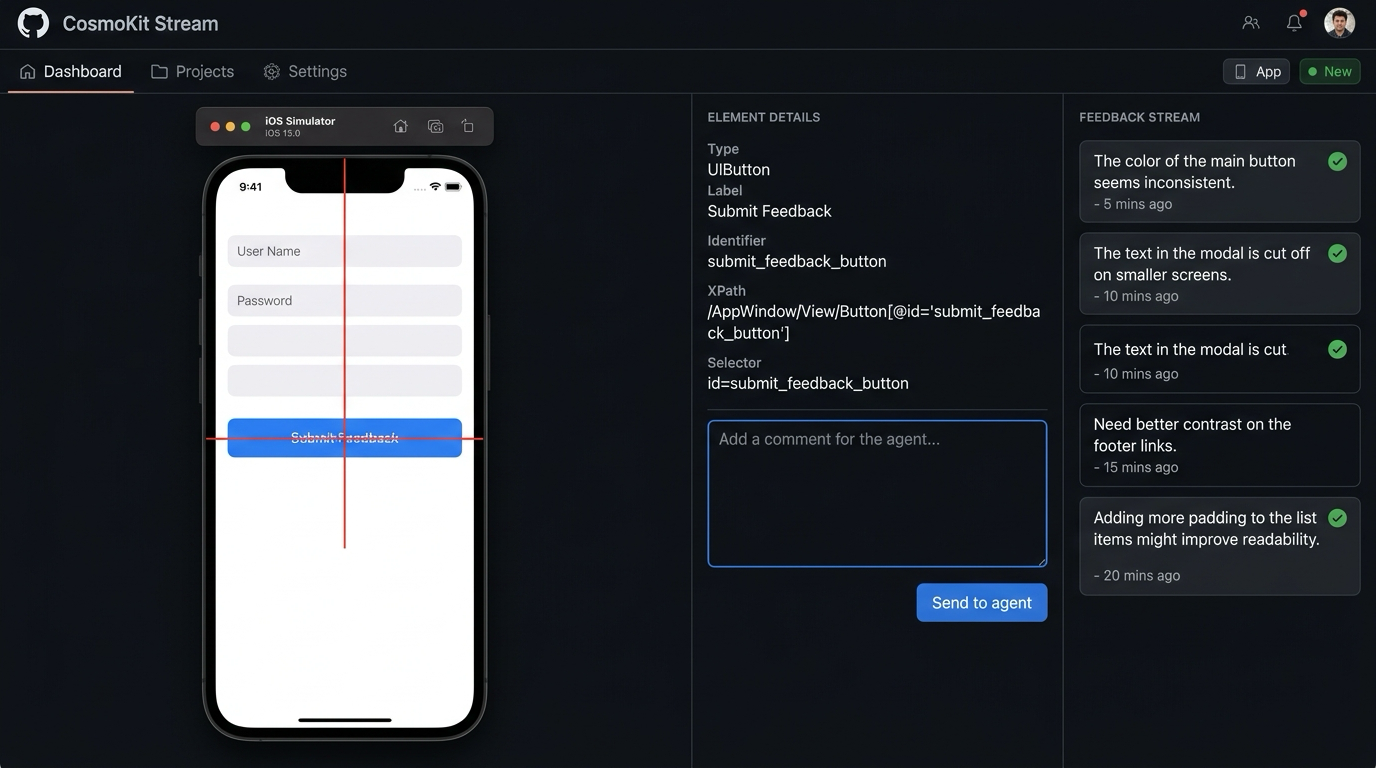
cosmokit agent stream serves a loopback MJPEG page with a per-session token. Click an element in the browser to see its resolved type, label, identifier, and frame, then leave a comment for the agent to read and acknowledge.
- Start the local stream with cosmokit agent stream --open
- Read comments with cosmokit feedback next or feedback list
- Clear handled comments with cosmokit feedback ack <seq>
- The stream stays on loopback and does not add a service to your app
Works with the tools you already use
Shell, MCP, Claude Code, Cursor, and Codex
Use the same simulator operations from a terminal or expose them to an MCP client over stdio. The cosmokit-simulator Agent Skill teaches Claude Code the tree, act, wait, and feedback loop; Cursor can use the included rule, and any MCP client can use the configuration snippet. You can also simulate network latency with cosmokit throttle and test offline states with cosmokit offline (requires CosmoKit 4.8.0+).
- cosmokit mcp exposes 56 typed simulator tools over stdio
- cosmokit throttle and cosmokit offline simulate network conditions (CosmoKit 4.8.0+)
- Install the Claude Code skill with cp -r skills/cosmokit-simulator ~/.claude/skills/
- Use cli/examples/cursor-rule.mdc for the same loop in Cursor
- Register cli/examples/mcp.json with any MCP client
{
  "mcpServers": {
    "cosmokit": {
      "command": "cosmokit",
      "args": ["mcp"]
    }
  }
}
Nothing added to your app
A public-API XCUITest driver runs beside it
The driver runs on the simulator through XCUITest public APIs. It does not require an SDK, framework, source access, or changes to the app you are testing, so it can drive apps you did not write.
- Run cosmokit doctor to check simulator and driver setup
- Run cosmokit agent start to build or reuse the driver
- The driver exposes status, app, tree, action, screenshot, and quit endpoints
- The first agent start builds the driver cold; later starts reuse the cached build
Free, on every plan
Start with the agent loop before you choose a plan
The cosmokit CLI and agent mode are free. Install the CLI, run doctor, start the driver, and let your agent inspect the Simulator without adding anything to the app you are testing.
- Read the full CLI guide and setup steps
- Use the same commands from scripts, editors, or MCP clients
- Compare the rest of CosmoKit's plans and features on the pricing page